
Unlimited free neighbourhood reports · Built for Canadian brokers
Help your clients picture life beyond the front door.
A showing starts with a property. A stronger conversation starts with the neighbourhood. Give your clients a clear, professional report that helps them explore the area, understand the community and take the next step with you. When a client agrees to stay in touch, that same report becomes a contact you can export to your CRM.
Unlimited Free reports. No credit card required. Your photo, brokerage and contact details included.
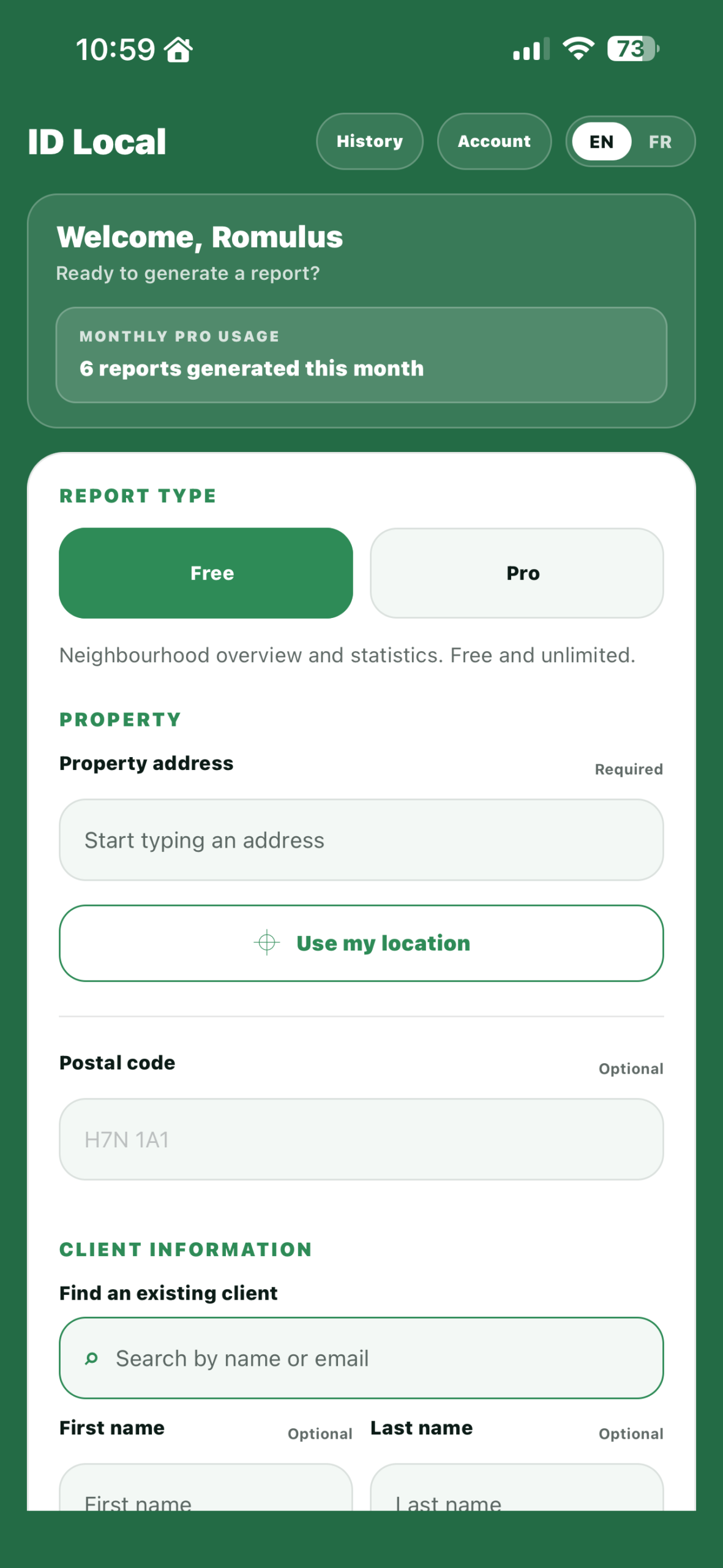
Use the ID Local mobile app on the go or generate the same reports from your web-based broker dashboard on any computer.


Brokers from these brokerages use ID Local







Brokerage names and logos are the property of their respective owners and do not imply endorsement or affiliation.
More value in every conversation
Give clients something worth keeping. And a reason to come back to you.
Help buyers see beyond the listing with a report they can read, share and revisit. Your professional identity stays alongside the information that helps them decide.
Before the showing
Make the introduction useful.
Send a Free neighbourhood report with the listing. Give buyers context about the community and housing before you meet.
After the visit
Keep the conversation going.
Follow up with something more useful than “What did you think?” Share local insights and ask what matters most in their next neighbourhood.
When details matter
Go further with Pro.
Explore nearby schools, healthcare, transit and everyday services, with travel estimates and access scores for a more detailed discussion.
“ID Local helps me bring more value to the conversation beyond the property itself. I can quickly share a professional neighbourhood report with my photo and contact details — a useful way to help clients explore an area and keep the conversation going.”
One account. Two ways to add value.
Start with the neighbourhood. Add the details with Pro.
Both report types include your broker profile and can be generated in English or French. Choose the depth that fits the conversation.
Statistics describe the census or postal area identified in each report. Local information and travel estimates depend on available data.
How it works
From your first address to your first client report.
Create your free broker account
Confirm your email and complete your professional profile with your photo, brokerage and contact information.
Choose an address and report type
Use the dashboard or mobile app. Enter a Canadian address, choose Free or Pro, then select English or French.
Share something useful
Download your PDF or add your client’s details and consent to send it by email. You receive a copy and can find it again in your history.
Send a professional personalized report from your web dashboard or using the ID Local app.
Reports that build your contact list
Every report you send can become a lead.
A neighbourhood report gives a client something useful. It also gives you a reason to ask whether they would like to hear from you again — and a record of their answer.
When you generate
Ask once, in the right moment.
The report form includes a checkbox asking whether your client agrees to be contacted later with offers from you. You ask while you are already delivering something they value.
In your dashboard
Their answer stays on file.
See who received which report, when it was sent and who agreed to be contacted. Your report history and your client records live in the same place.
Whenever you need it
Export to the CRM you already use.
Download your contact list as an Excel file and import it into your own CRM. The people you helped become the list you follow up with.
Simple pricing
Free stays free. Pro adds more.
Start with unlimited Free neighbourhood reports. No payment information required, no subscription, no expiry. Add Pro report credits only when a client needs the detailed version.
Unlimited, every month
Free reports
$0 / month
No credit card. No subscription.
Seven-page neighbourhood report with your photo, brokerage and contact details
When a client wants more detail
Pro reports
from $0.58 / report
Added to your account as report credits
Every new account starts with two Pro reports included
Billed yearly: $0.63 per report on Essential (25 Pro reports a month) and $0.58 on Professional (40 a month). Monthly billing costs a little more.
Compare Pro plans
Annual billing gives you more than two months on us. Pay month to month instead.
Yearly billing selected.
25 Pro reports per month
Essential
$15.75 / month
Billed $189 per year
Save $50.40 — more than 2 months on us
$19.95 / month
Billed monthly
Choose yearly and save $50.40
40 Pro reports per month
Professional
$23.25 / month
Billed $279 per year
Save $80.40 — more than 2 months on us
$29.95 / month
Billed monthly
Choose yearly and save $80.40
Every account includes
- Mobile app and broker dashboard
- English and French reports
- Report history and resend
- Client records and consent tracking
- Client-list Excel exports
- Reports branded with your details
Good to know
A few questions before you start.
Are Free neighbourhood reports really unlimited?
Yes. Registered brokers can generate unlimited Free neighbourhood reports without a paid subscription. Free reports do not use Pro report credits.
Do I need a credit card to register?
No. Create your account, confirm your email and complete your broker profile to start generating Free reports.
Will the report show my professional information?
Yes. Free and Pro reports include the photo, brokerage and contact details saved in your professional profile.
Can I email a report directly to a client?
Yes. Add your client’s details and the required consent when generating the report. You also receive a copy, and the report remains available in your history.
Do I need to install the app?
No. You can generate reports from the web dashboard. The iPhone and Android apps give you another way to use your account while you are out with clients.
Can a report turn into a lead?
Yes. When you generate a report for a client, the form includes a consent checkbox asking whether they agree to be contacted later with offers from you. Every client who accepts is saved to your dashboard with their report history, and you can export the list to Excel to import into your CRM.
How much does a Pro report cost?
Pro reports come as monthly report credits on an Essential or Professional plan, from $0.58 per report on the yearly Professional plan. Open Compare Pro plans in the pricing section for the full breakdown. Free reports stay free and never use credits.
What is the difference between Free and Pro?
Free introduces the neighbourhood with local context, a map and community and housing statistics. Pro adds detailed nearby services, travel estimates and access scores. Pro uses report credits; Free does not.
Ready to add value before the next showing?
Your next client report starts here.
Create your free account and share neighbourhood reports personalized with your photo, brokerage and contact details. Start on your computer or use the app on the go. Upgrade to Pro whenever you need more detail.
Create your free account- Create your account
- Complete your profile
- Choose an address
- Share your Free report